
Need a simple Japanese attendance sheet template for Excel? These free templates can be used to record employee time in, time out, lunch breaks, daily attendance, remarks, and monthly confirmation.
They are useful for small businesses, departments, part-time staff, temporary workers, or overseas companies that need a simple attendance record in a format that feels familiar in Japanese workplaces.
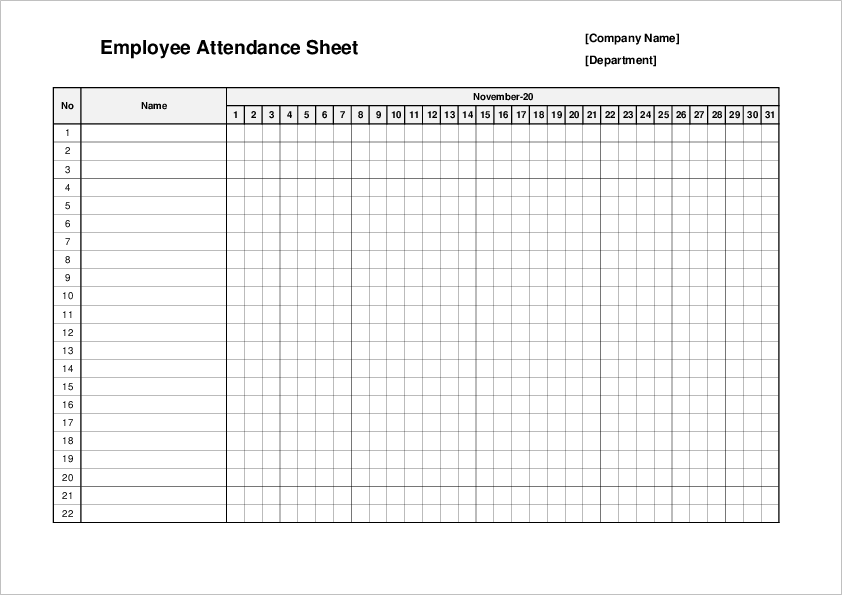
On this page, you can download Excel attendance sheet templates in vertical and horizontal layouts. Some templates are designed for one employee, while another template can be used to track multiple employees on one sheet.
In Japan, attendance records are often checked quite carefully by managers, HR staff, or accounting staff before payroll is processed. Even if a company uses a digital attendance system, Excel-based records may still be used for small teams, temporary work, internal confirmation, or as a backup. A clean monthly format helps avoid small but annoying questions at the end of the month.
Free Japanese Attendance Sheet Templates for Excel
These Japanese-style attendance sheet templates are made for recording employee attendance by day or by month. You can enter the employee name, department, work date, time in, time out, break time, remarks, and approval information.
Click the thumbnail image to see a larger preview. Use the “Download” button below each image to open the download page.
What Is a Japanese Attendance Sheet?
A Japanese attendance sheet is a document used to record when an employee starts work, finishes work, and takes breaks. In Japan, this type of sheet is often called a “勤怠表” or “出勤簿” in Japanese.
It is different from a shift schedule. A shift schedule shows planned working hours, while an attendance sheet records actual attendance.
For example, a shift schedule may say that an employee is scheduled from 9:00 to 18:00. The attendance sheet records what actually happened, such as arriving at 8:55, leaving at 18:10, and taking a lunch break from 12:00 to 13:00.
- Employee name
- Department or affiliation
- Year and month
- Date
- Day of the week
- Time in
- Time out
- Break time or lunch break
- Remarks
- Employee confirmation
- Manager approval
A common mistake is recording only the total working hours and leaving out break time. It looks simple at first, but later it becomes harder to check how the total was calculated. In Japanese workplaces, the person checking the sheet may want to see the actual start time, end time, and break time separately. It is a little more work, but much easier to review.
Attendance Sheet Templates
Japanese Daily Attendance Sheet Template 01
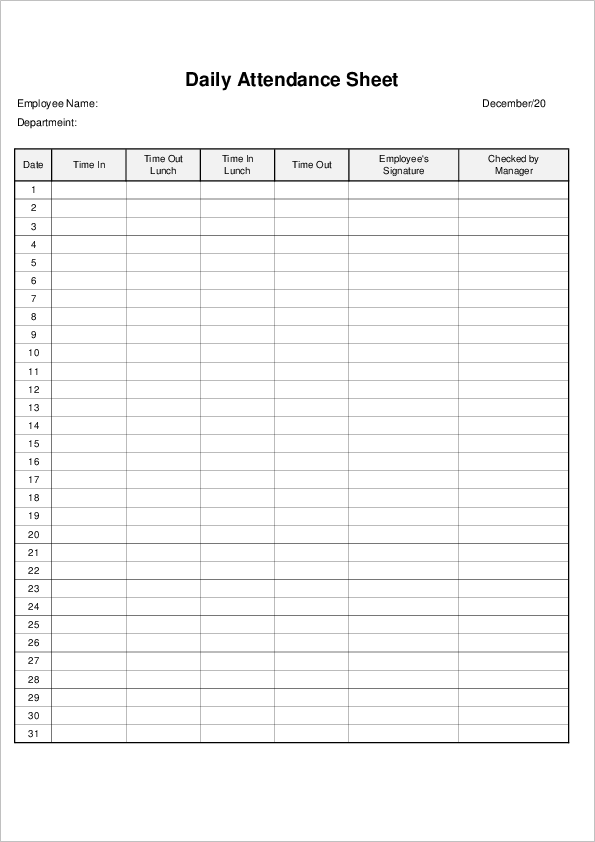
Japanese Daily Attendance Sheet Template 02

Multiple Employee Attendance Sheet Template 03
How to Use a Japanese Attendance Sheet in Excel
First, choose the template that matches your purpose. If you need to manage one employee’s monthly attendance in detail, use a vertical daily attendance sheet. If you want to check attendance for several employees at a glance, use the multiple employee template.
After downloading the template, open it in Excel and enter the employee name, department, year, and month. Then record the time in, time out, and break time each day.
It is better to fill in the sheet every day instead of waiting until the end of the month. This sounds obvious, but this is where people often get stuck. Once several days pass, exact arrival times and break times become surprisingly hard to remember. Monday morning feels clear at the time, but by Friday afternoon, small details are already blurry.
If the sheet will be submitted to a manager or administrative staff member, check for blank cells before submitting it. In Japan, even one missing time entry may come back as a correction request.
Tips for Managing Attendance Records in Japan
Attendance records should be easy to check later. Use the same time format throughout the sheet, such as 09:00 or 18:30. Mixing formats like “9am,” “9:00,” and “09:00” makes the sheet look messy and can also make calculations harder.
- Use one row for one day or one employee.
- Record break time separately from working time.
- Use a consistent time format, such as 09:00.
- Keep remarks short and specific.
- Check missing entries before the end of the month.
- Have the employee and manager review the sheet if required.
In Japanese companies, manager confirmation may be required at the end of the month. Some workplaces use signatures, while others use stamps or digital approval. The important thing is that the person checking the sheet can understand the record without asking many extra questions.
For example, if an employee left early, writing only “personal reason” may be too vague in some workplaces. A short note such as “Left early for appointment” is often easier to understand. Not too detailed, not too empty. That balance is usually best.
Japanese Attendance Sheet vs Shift Schedule
An attendance sheet and a shift schedule are similar, but they are not the same.
A shift schedule is used before work happens. It shows who is planned to work and at what time. An attendance sheet is used after or during work. It records the actual time worked.
For small teams, it may be tempting to use one sheet for both. That can work for a while, but it often becomes confusing later. If planned shifts and actual attendance are different, it is better to keep them separate.
This is especially important when employees work overtime, leave early, take unpaid leave, or change shifts. The planned schedule and the actual attendance record should not be mixed too casually.
When Excel Is Enough, and When a System Is Better
Excel attendance sheets are useful for small teams, simple records, temporary work, or backup management. They are easy to edit, print, and share.
However, if many employees need to record time every day, or if you need automatic calculations, approval workflows, overtime checks, or payroll integration, attendance management software may be more efficient.
For a small office, a local branch, or a simple monthly record, though, an Excel attendance sheet is often the fastest and easiest starting point. It is plain, but that is not a bad thing. Plain sheets are often easier for everyone to check.
Summary
A Japanese attendance sheet is used to record actual employee attendance, including time in, time out, and break time. It helps managers, HR staff, and administrative staff check monthly attendance records clearly.
Download the Excel attendance sheet template that matches your purpose, enter the required information regularly, and keep the format simple. A clean attendance sheet may look ordinary, but at the end of the month, it makes confirmation work much easier.